

The KYC process is completed through the Gate TR mobile app. You will need to provide personal and residential information, verify your phone number, scan your identity document, submit a selfie and proof of residence, and complete a video verification step after your application is reviewed.
Key Takeaways
- KYC verification is required on Gate TR before users can access relevant crypto and fiat services.
- The process is completed through the Gate TR app, starting from your account profile and the KYC section.
- You may need to provide personal and address information, including your name, citizenship, date of birth, phone number, and residential address.
- Identity documents, a liveness check, and proof of address are required during the identity verification process.
- Video verification is the final stage after your submitted information has been reviewed.
What Do You Need for Gate TR KYC?
Before starting the verification process, prepare the information and documents required by Gate TR. The current individual verification process asks users to provide personal information, residential details, an identity document, a selfie, and a Residence Certificate.
You may need:
- Full name
- Citizenship
- Phone number
- Date of birth
- Country and residential address
- Front and back of your identity card
- A clear selfie
- Residence Certificate
The residential information entered during KYC should match the information shown on your Residence Certificate.
What You Need for Identity Verification
Before starting the identity verification process, make sure you have your ID with you, have downloaded a recent proof of address from e-Devlet, and are in a well-lit and quiet place for the video verification.
How to Get Proof of Address
You can get your proof of address through e-Devlet.
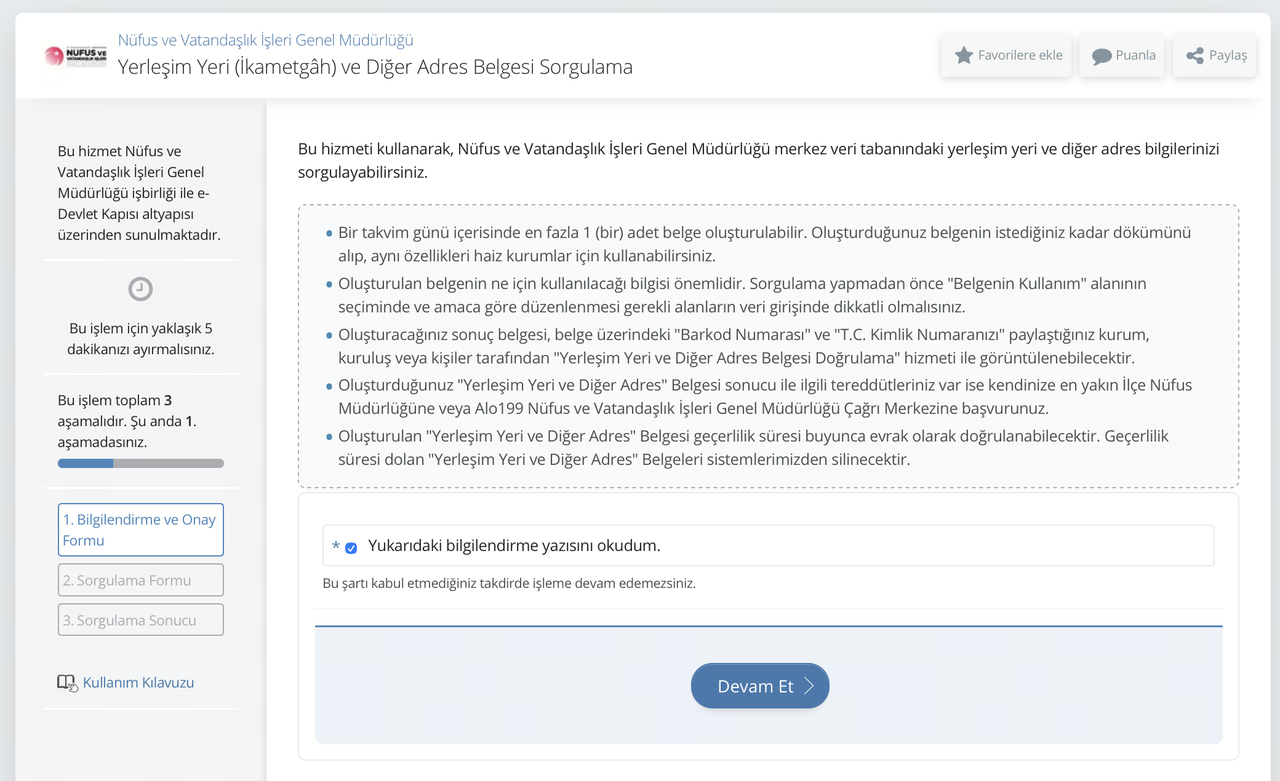
After logging in to e-Devlet, go to the “Place of Residence and Other Address Document Inquiry” service provided by the General Directorate of Population and Citizenship Affairs. Check the box confirming that you have read the information, then click Continue.
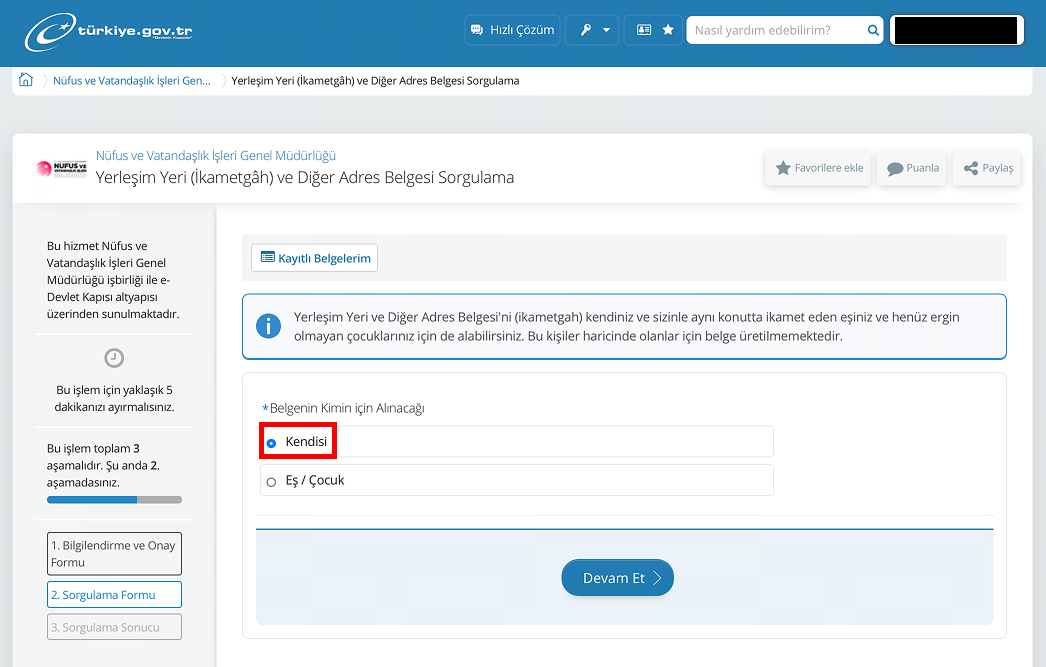
In the section asking who the document is for, select Myself.
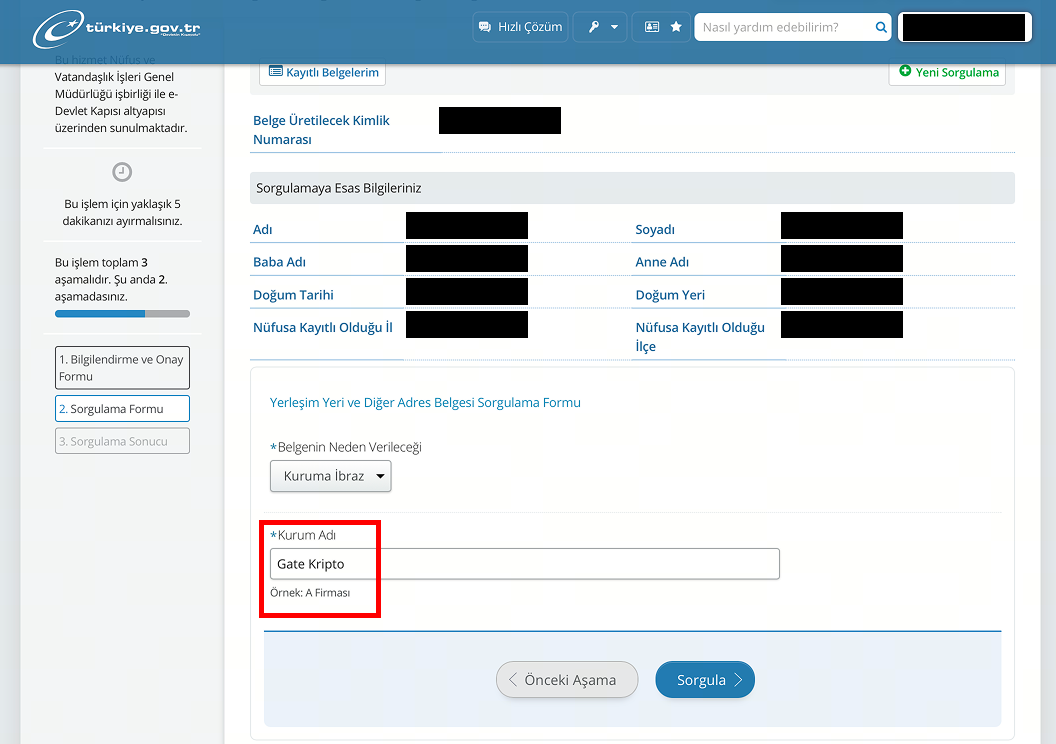
When creating the document, select “Submit to an Institution” and enter “Gate Kripto” as the institution name.
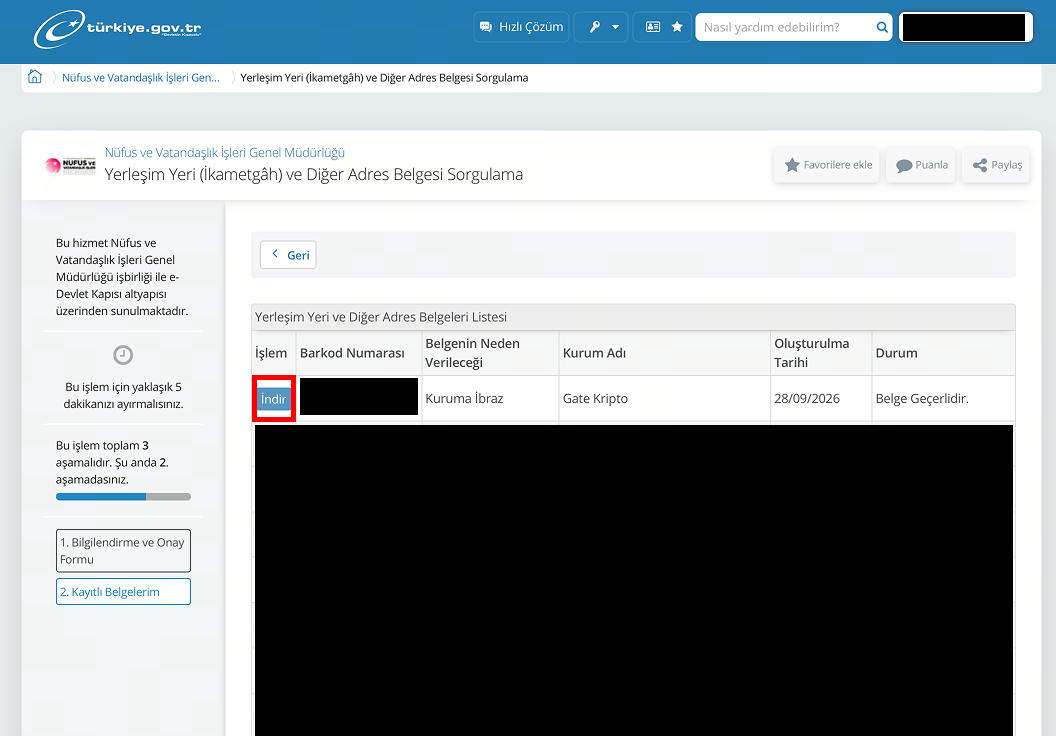
Click Search to create the document. Please make sure you download the most recently created document.
How to Complete KYC Verification on Gate TR
Step 1: Log In to Your Gate TR Account
Open the Gate TR mobile app and log in to your account. From the home screen, tap the profile icon in the upper-left corner.
If your account has not completed identity verification, your profile will show a “Not Verified” status. Tap this section to continue.
Step 2: Open KYC Verification
On the next page, select “KYC (Identity Verification)”.
This will take you to the individual identity verification page, where you can start the verification process.
Step 3: Start Individual Verification
On the Individual Verification page, tap “Verify Now.”
Gate TR will then guide you through the information and verification requirements step by step.
Step 4: Upload Your Documents
Upload the required documents step by step. Follow the instructions on the screen throughout the process.
- Upload your ID: At this step, you need to upload photos of the front and back of your ID. If the ID upload page does not open, please check your phone’s camera permissions and make sure the Gate TR app has access to your camera.
- Liveness check: When you tap the button, you will see some instructions on the screen. Follow these instructions, move your head as requested, and complete the liveness check. To avoid any issues, make sure you are in a well-lit area.
- Upload your proof of address: Upload a recent proof of address document downloaded from the e-Devlet app.
Step 5: Verify Your Personal Information
Based on the documents you uploaded, the Gate TR KYC system automatically fills in the required information. Please check that all the information is correct. If there is an error in your personal information, correct it. Also, review and confirm your address information.
Step 6: Provide Additional Information
Answer the questions provided so we can better understand your profile.
Step 7: Join the Video Verification
After your information and documents are reviewed, the Video Verification feature will become available. Go to the video verification section and follow the instructions on the screen.
Step 8: Deposit TRY
After successfully completing the video verification, you need to deposit a minimum of 1 TRY from one of your bank accounts to activate your account and complete the verification process.
What Happens After Gate TR KYC Verification?
Once the KYC process is completed, verified users can access services that require identity verification, including cryptocurrency deposits and withdrawals and fiat currency trading.
If your verification is still being reviewed after you have submitted all required information, allow some time for the review process to be completed. Gate TR also provides customer support through its Help Center and support channels if you encounter issues.
Tips for Completing Gate TR KYC Successfully
A few simple checks can help avoid unnecessary delays:
- Use accurate personal information: Make sure your name, date of birth, citizenship, and other details match your identity document.
- Check your address carefully: Your entered residential information should match your Residence Certificate.
- Upload clear documents: Make sure both sides of your identity card are clearly visible.
- Take a clear selfie: Follow the instructions displayed in the app when completing the selfie check.
- Prepare your Residence Certificate: If required, obtain the document through Turkey’s e-Government system before starting the address verification step.
- Complete video verification: Check your account after the initial review and complete the video call when it becomes available.
Frequently Asked Questions
Is KYC required on Gate TR?
Yes. Gate TR requires users to complete KYC identity verification to use services that require verification, including crypto deposits and withdrawals and fiat currency trading.
What documents are required for Gate TR KYC?
The current individual verification process requires the front and back of an identity card, a selfie, and a Residence Certificate, along with the personal and residential information requested in the app.
Can I complete Gate TR KYC on the mobile app?
Yes. Gate TR’s official KYC guide describes the verification process through the Gate TR mobile app.
Why does Gate TR require a Residence Certificate?
The Residence Certificate is used as part of the address verification process. The residential information shown on the certificate should match the information provided during KYC.
What happens after I submit my KYC?
Gate TR reviews the submitted information. Once the review is complete, Video Call Verification can be activated. Users then need to complete the video verification instructions and the final account activation step described by Gate TR.
What should I do if my KYC verification is not completed?
If your verification remains pending or you encounter a problem, check that the submitted information and documents meet the requirements. You can also contact Gate TR support through its Help Center or support channels.
Final Thoughts
Gate TR’s KYC process combines personal information verification, phone verification, identity document scanning, selfie verification, proof of residence, and video verification. Preparing the required information and documents in advance can make the process easier.
Once verification is completed, users can access Gate TR services that require KYC, including crypto deposits and withdrawals and fiat currency trading.
Disclaimer
* Legal Notice 1: This content does not constitute investment advice. It is not intended to promote the buying/selling of digital assets and is for informational purposes only. Crypto assets carry high risks and may be subject to significant price fluctuations. Before making any investment decision, you should assess your own financial situation and make an independent decision.
* Legal Notice 2: The data and charts provided in the article are for general informational purposes only. Although all content is carefully prepared, no responsibility is accepted for possible errors or omissions. The Gate TR Learn team may translate this content into different languages. No translated article may be copied, reproduced, or distributed without permission.
Share
Content
Key Takeaways
What Do You Need for Gate TR KYC?
What You Need for Identity Verification
How to Get Proof of Address
How to Complete KYC Verification on Gate TR
What Happens After Gate TR KYC Verification?
Tips for Completing Gate TR KYC Successfully
Frequently Asked Questions
Final Thoughts


Sign Up
Related Articles

Beginner
Trading Logic of Altcoins: Fundamental Analysis and Technical Analysis
In the crypto market, altcoins involve high risk and high rewards. Unlike more mature Bitcoin, its prices can be easily influenced by news and large investors. This article will teach you how to build a customized altcoin trading strategy using three methods: fundamental analysis, technical analysis, and smart money tracking.
2025-11-24 09:30:10