

1. Funds Not Deposited
A blockchain transaction typically involves 3 key stages: Request – Confirmation – Funds Received
- Request: If the sender sees the withdrawal status as “completed” or “successful,” it means the transaction has been processed and sent to the blockchain for confirmation. However, this does not mean the funds have reached the receiving platform yet.
- Confirmation: Blockchain confirmations can take time. Once the required number of confirmations is reached, the funds are sent to the receiving platform. Please be patient during this stage.
- Funds Received: After the transaction is confirmed on the blockchain and meets the minimum confirmation requirements, the funds are delivered to the recipient address.
Note:
- Network congestion can cause delays when a high number of transactions are being processed. Please wait patiently. You can check the transaction status using your TXID.
- If your deposit is taking longer than usual or is not recorded, use the Accelerated Assistance feature. After submitting your request, check the status again within 5–30 minutes.
- If the transaction is confirmed on the network and acceleration was applied but the funds still haven’t arrived, contact Customer Support. You will need to provide your UID, TXID, and a screenshot of the transaction from the sending platform.
2. I Forgot to Add a Tag or Memo
For cryptocurrencies like XRP or EOS, entering a Tag or Memo is mandatory along with the recipient address.
If the Tag or Memo was missing or incorrect, the transaction may go through on the blockchain, but the funds may not reach the recipient account.
In this case, you need to provide:
- Your Gate TR user ID (UID)
- The correct Tag or Memo
- The TXID (in text format)
- A screenshot of the transaction from the sending platform
Please submit a support request with these details. Once verified, the funds will be manually credited to your Gate TR account.
3. I Deposited an Unsupported Coin
If you deposited an unsupported token or used the wrong blockchain network, you can submit a Token Recovery request to retrieve your funds.
Note:
There is a 20 USDT fee for the token recovery process. Please make sure your spot account has sufficient balance to cover this fee.
How to apply for token recovery?
4. How to view block info?
We’ll explain this using an example transaction of GT on the ERC20 network.
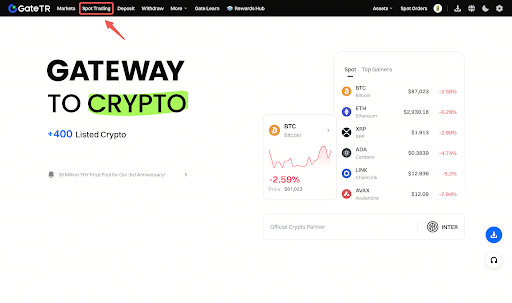
Step 1: Log in to your Gate TR account and go to the Spot Trading page.
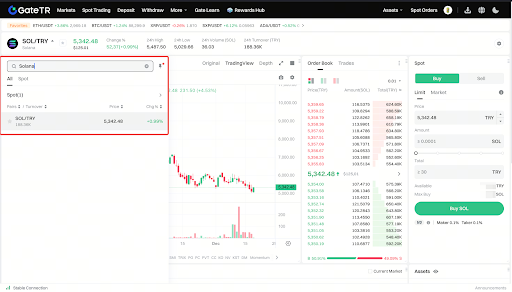
Step 2: Type the name of the coin into the search bar.
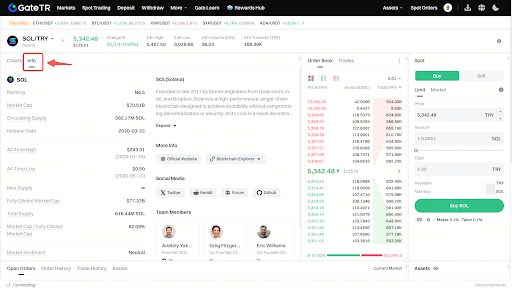
Step 3: On the coin’s page, click the “Info” tab.
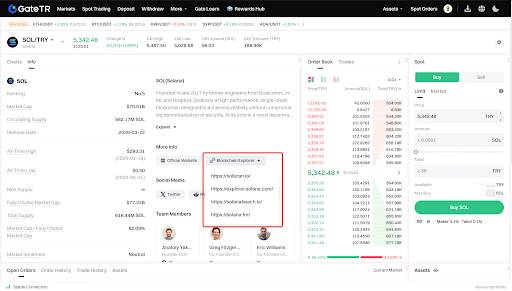
Step 4: Click the link under “Explorers” in the highlighted area. This will redirect you to the relevant blockchain explorer.
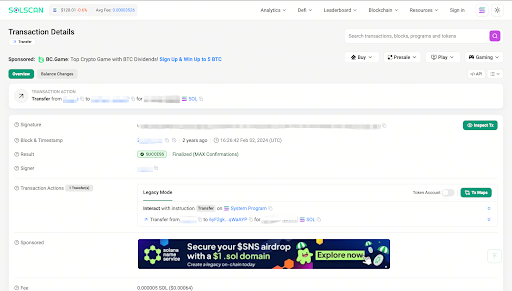
Step 5: Paste your TXID into the search bar and press enter.

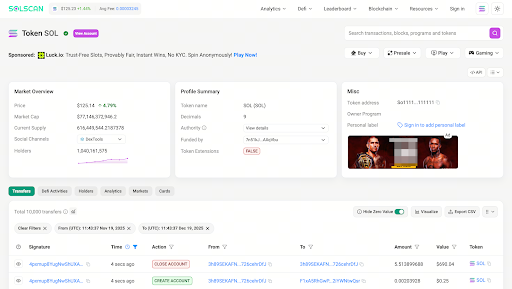
Step 6: You will now see all the details of your transaction. For more information, click on the coin name (e.g., Solana).
For any issues, feel free to contact destek@gate.com.tr. You can also use the Gate TR app: go to your profile and tap the microphone icon in the top right to reach the Help Center and speak with a support agent.
You can also submit feedback through our Suggestions & Feedback page to win rewards!
