

GateCode is a fast and free fund transfer method between Gate TR users. All cryptocurrencies on the platform can be converted into GateCode.
- Sender (withdrawal): Creates the GateCode via the GateCode Withdrawal page.
- Receiver (deposit): Uses the GateCode via the GateCode Deposit page.
Withdraw Using GateCode
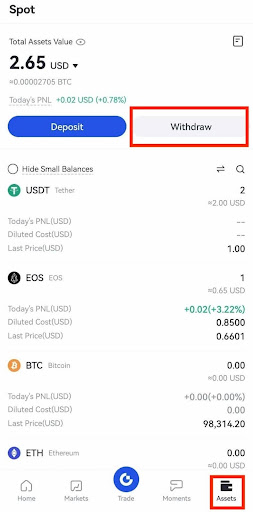
Step 1: Open the app and log in. Tap “Assets” > “Withdraw” from the bottom menu.
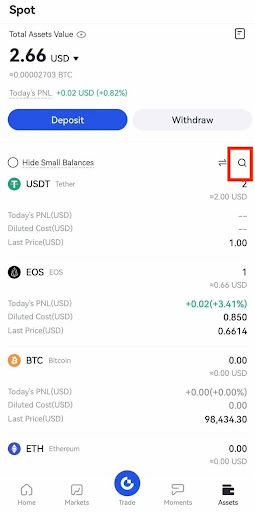
Alternatively, search for the coin and tap “Withdraw.”
Step 2: Select “GateCode.”

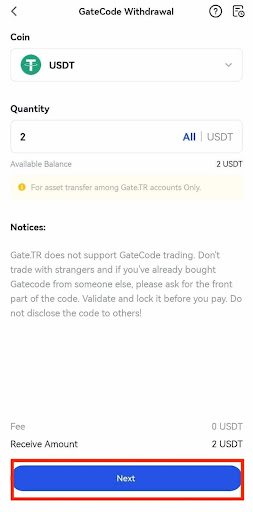
Step 3: Enter the amount to withdraw and tap “Next.”
Step 4: Enter the following security details:
- Fund password
- SMS verification code
- Google Authenticator code
After checking the info, tap “Confirm.”

Step 5: Once the withdrawal is complete, you can:
- Save the GateCode visually
- Copy it as a Full GateCode or Partial GateCode
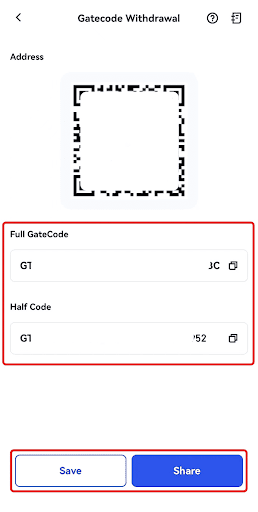
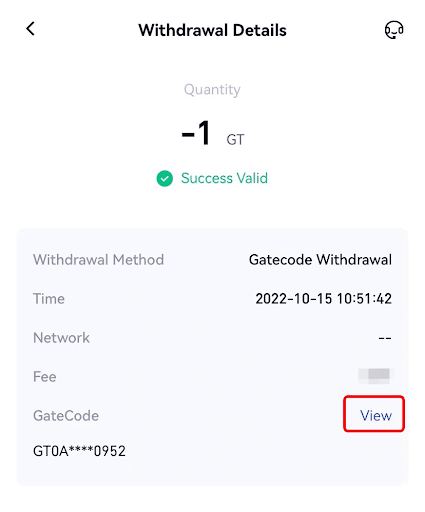
Step 6: Alternatively, go to Withdrawal Details and tap “View” to see the Full GateCode.
Deposit Using GateCode
Step 1: Log in to the app. Go to “Assets” > “Deposit.”

Or search for the coin and tap “Deposit.”
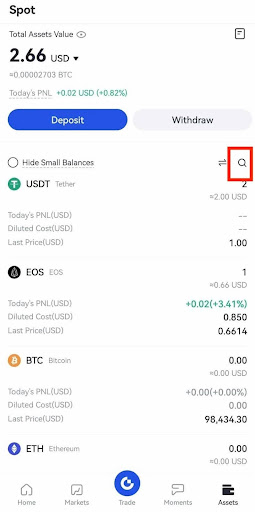
Step 2: Select “GateCode.”

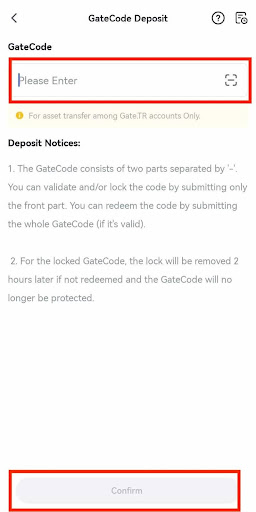
Step 3 : On the GateCode Deposit page:
- Scan the saved QR code, or
- Paste the copied GateCode
After checking the info, tap “Confirm.”
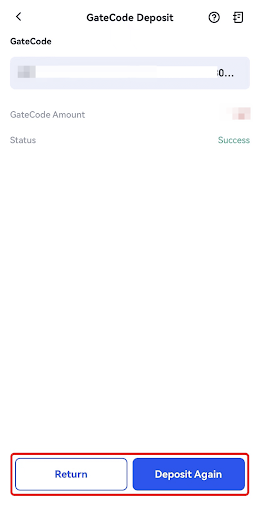
Step 4: Once the process is successful, you’ll see the deposit details. You can return to the previous page or start a new deposit.
Important Notes
- Verify the recipient before sharing your GateCode. Never share it with strangers.
- Gate TR does not offer any trading platform for GateCode exchanges. Be cautious when using it with third parties.
- A GateCode has two parts, separated by a dash:
- The first part can be used to verify or lock the code.
- Full GateCode is required for deposits.
- Once locked, if a GateCode is not deposited within 2 hours, it is automatically unlocked.
For any issues, feel free to contact destek@gate.com.tr. You can also use the Gate TR app: go to your profile and tap the microphone icon in the top right to reach the Help Center and speak with a support agent.
You can also submit feedback through our Suggestions & Feedback page to win rewards!
