

Gate TR Onchain Deposit:
Step 1 : Log in to the Gate TR app. Tap “Assets” from the bottom menu, then select “Deposit.”

Step 2 : On the next screen, tap “On-Chain Deposit.” Find and tap the coin you want to deposit.

Step 3 : After selecting the coin, choose the appropriate network/chain. Copy the deposit address provided by Gate TR or save the QR code.
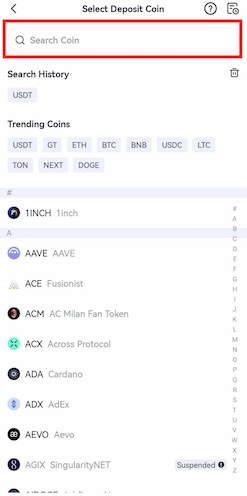
Step 4: On the sending platform, be sure to select the same blockchain network. Otherwise, the assets may be lost.
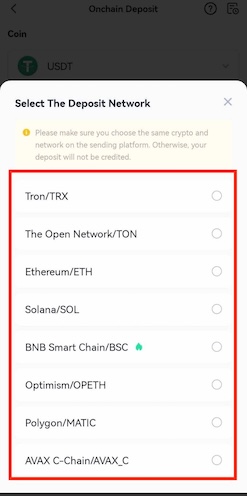
Step 5: Paste the deposit address into the address field or scan the QR code on the sending platform to proceed.
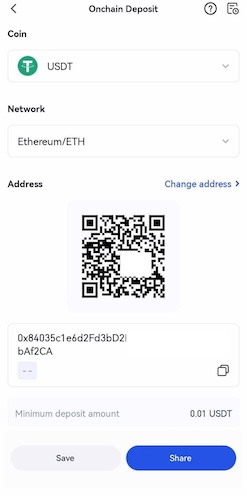
Gate TR Onchain Withdrawal:
Step 1 : After logging into the app, go to the “Assets” section and tap “Withdraw.”
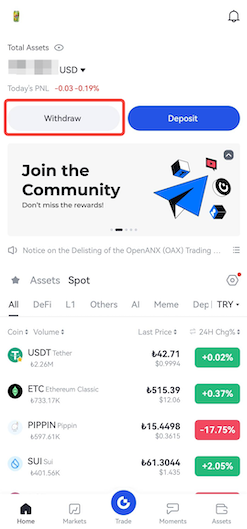
Step 2: Find the cryptocurrency you want to withdraw and select “On-Chain Withdrawal.” (e.g., USDT)
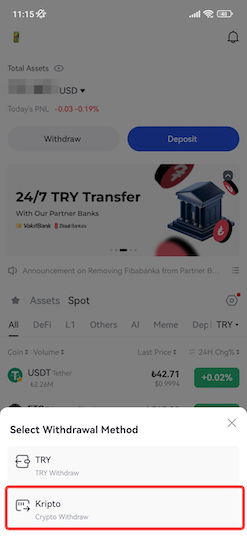
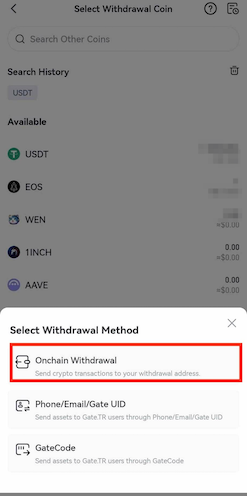
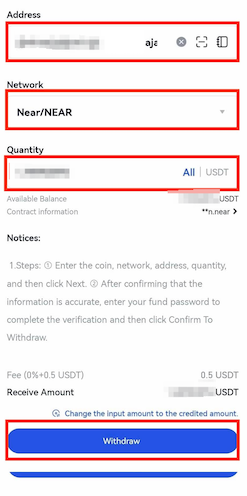
Step 3:
- Choose the network/chain to be used
- Enter the recipient address
- Enter the amount to withdraw
- After verifying all details, tap the “Withdraw” button
Note: The selected withdrawal network must match the deposit network on the receiving platform. Otherwise, the assets may be unrecoverable.
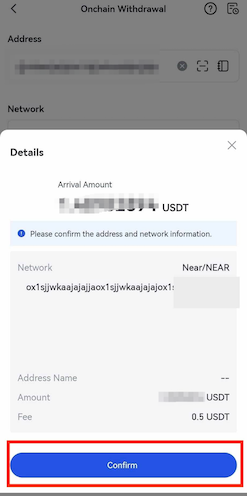
Step 4: Finalize the transaction:
- Enter your fund password
- Enter the Google Authenticator code
- Then confirm the withdrawal
For any issues, feel free to contact destek@gate.com.tr. You can also use the Gate TR app: go to your profile and tap the microphone icon in the top right to reach the Help Center and speak with a support agent.
You can also submit feedback through our Suggestions & Feedback page to win rewards!
