

What is Tronscan and how to use it?
2025-11-18 07:46:22
This article will guide you through understanding what Tronscan is and how to use its features, provide a step-by-step guide to get started, and make comparisons with other scanners such as Polygonscan.
Tronscan is a blockchain explorer that goes beyond the basics, offering wallet management, token tracking, smart contract information and governance engagement. By 2025, it has evolved with enhanced security features, expanded analytics, cross-chain integration and improved mobile experience. The platform now includes advanced biometric authentication, real-time transaction monitoring and a comprehensive DeFi dashboard. Developers benefit from AI-powered smart contract analysis and improved testing environments, while users enjoy a unified multi-chain portfolio view and gesture-based navigation on mobile devices.
Tronscan in 2025: Latest Developments
In 2025, Tronscan has evolved significantly and has become an even more important tool for TRON network users. Recent developments have focused on security enhancements, user experience improvements and expanded integration capabilities.
Advanced Security Features
Tronscan has implemented several security upgrades to protect users in an increasingly complex blockchain environment:
• Advanced Biometric Authentication, including facial recognition and fingerprint verification for wallet access.
• Real-Time Transaction Monitoring, with AI-powered suspicious activity alerts.
• Hardware Security Module (HSM) Integration for enterprise users managing large asset portfolios.
• Advanced Two-Factor Authentication, with additional verification methods beyond the standard SMS and email options.
Expanded Analytical Dashboard
The platform now offers more comprehensive analysis tools and a deeper insight into the TRON ecosystem.
Cross Chain Integration
Tronscan offers a more comprehensive blockchain experience by expanding cross-chain capabilities:
• Multi-Chain Explorer provides users with tracking functionality to monitor assets on TRON, Ethereum, BNB Chain and other major blockchains.
• Cross-Chain Bridge Interface, for seamless asset transfers between networks directly within Tronscan.
• Unified Portfolio View, displaying assets across multiple blockchains in a single dashboard.
• Cross Chain Transaction History, with detailed records of bridge transfers and their status.
Tronscan Mobile Experience
The mobile version of Tronscan was completely redesigned in 2025 and has features specifically optimized for users on the go:
• Hand Sign Based Navigation for intuitive wallet management.
• For Push Notifications, trade confirmations and price alerts.
• Offline Mode, allowing limited functionality without an internet connection.
• QR Code Enhancement has advanced scanning capabilities for fast address recognition.
Developer Tools Expansion
Tronscan has significantly improved its service for developers developing on the TRON network.
Integration with Decentralized Finance (DeFi)
Tronscan now serves as a comprehensive DeFi control panel providing direct access to various DeFi protocols:
• Yield Farming Analytics, showing real-time APY across multiple protocols.
• Liquidity Position Management, to monitor and adjust LP positions.
• Loan Market Overview, showing lending/borrowing rates across platforms.
• DeFi Risk Assessment Tools, providing protocol security metrics and insurance options.
Tronscan’s latest developments demonstrate the platform’s commitment to evolve alongside the overall blockchain ecosystem. By enhancing security features, expanding analytical capabilities and integrating cross-chain functionality, Tronscan has solidified its position as an essential tool for anyone interacting with the TRON network. These improvements make blockchain data more accessible and actionable for users of all experience levels, from casual TRX holders to institutional investors and developers.
As blockchain technology evolves, TRON users, developers and fans can benefit from the features Tronscan provides for the TRON ecosystem. Tronscan is not only a discovery tool, but also a gateway to the inner workings of the TRON blockchain.
What is Tronscan?
Tronscan is the official blockchain explorer for the TRON network. It offers what traditional blockchain travelers offer by providing real-time access. Users can verify and confirm transactions and view accounts, balances, blocks, nodes and smart contracts.
Beyond these core features, Tronscan can also be used for governance engagement in the form of wallet management (via the built-in web wallet), token creation, smart contract deployment, Dapp interactions and voting.
Tronscan has been designed with several important goals and features in mind. These include transaction tracking, wallet management, token balances, governance and smart contract insight.
Transaction Tracking
Tronscan allows users to explore TRON’s trading history in real-time. This feature allows users to monitor the flow of TRX and various TRC tokens, view transaction details and verify transactions on the network.
Wallet Management
Another helpful feature in Tronscan allows users to create and manage TRON wallets. If you need to import an existing wallet or create a new one, the platform allows you to manage your wallet to store your assets securely.
Token Balances
Tronscan gives you an overview of your wallet’s token balances, to see how many TRX and TRC tokens you have. This knowledge is vital to effectively manage your digital assets.
Participation in Governance
Users can do more than just explore the TRON ecosystem. It also enables active participation in TRON’s governance processes. For example, you can lock your TRX and vote for Super Representatives, so you can participate in TRON’s decision-making processes.
Smart Contracts
Tronscan provides insights into the execution of smart contracts on the TRON network. You can track smart contract transactions, view their source code and evaluate the TRON Dapp ecosystem.
Although Tronscan is free and accessible for everyone to explore, users can take advantage of all the features on the platform by creating an account.
How to Create a Tronscan Account?
Creating a Tronscan account is easy. Go to the Tronscan.org website to create an account. From the homepage, create an account by registering with a valid email address and password. You can also choose to create an account using your phone number. Instead, you can connect with a decentralized wallet like Tronlink or Ledger wallet.

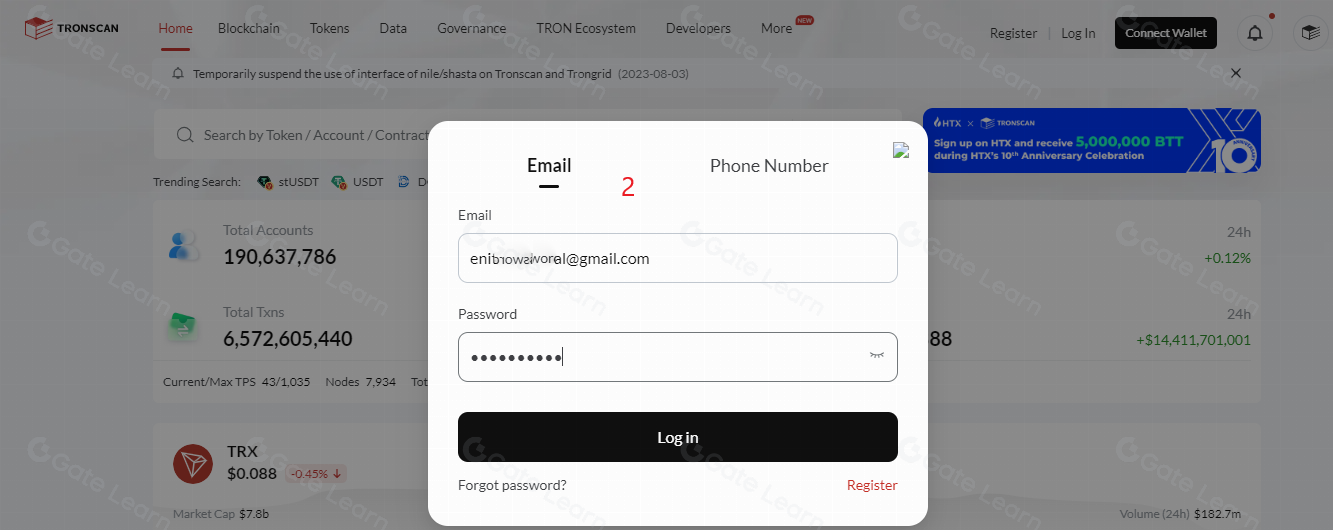
Source: Tronscan.org
After creating an account, you will be sent an email to activate your account. After activating your account, you can log in to the website and start exploring.
How to use Tronscan?
Tronscan allows you to manage your digital assets on the TRON blockchain. A guide on how to create a wallet and manage your assets using Tronscan is available here.
Click Connect to access the Tronlink wallet.
Select Tronlink. You can import your wallet if you have already created one and installed Tronlink in the Chrome extension. If it is not installed and you have not created a wallet account before, you will be asked to install the app plugin in your browser.
Follow the instructions to create your wallet. You will be asked to choose a username and password. Store your mnemonics securely by typing them alphabetically, you will be asked to enter them to verify that you have stored them.
Once you have created your wallet, click the Connect button to connect your wallet to Tronscan. If you encounter problems, just reload the page and connect again. Congratulations! You have successfully created a Tronlink wallet. You can also see the tokens you have, their amount and value.
Conclusion
Tronscan offers a wide range of features from transaction monitoring to wallet management, token balances, governance, smart contracts and insights. With Tronscan’s many use cases, users need to think about security to manage their TRON assets.
Disclaimer
* Legal Notice 1: This content does not constitute investment advice. It is not intended to promote the buying/selling of digital assets and is for informational purposes only. Crypto assets carry high risks and may be subject to significant price fluctuations. Before making any investment decision, you should assess your own financial situation and make an independent decision.
* Legal Notice 2: The data and charts provided in the article are for general informational purposes only. Although all content is carefully prepared, no responsibility is accepted for possible errors or omissions. The Gate Academy team may translate this content into different languages. No translated article may be copied, reproduced, or distributed without permission.


Related Articles
Beginner
The Legal Journey of Cryptocurrencies in Turkey
This content outlines the definition, historical development, underlying reasons, and necessities of cryptocurrency regulations in Turkey.
2025-11-18 08:41:34

Beginner
What is HyperGPT (HGPT)?
This article offers an in-depth look into the infrastructure, products, and ecosystem of the HyperGPT (HGPT) project, while focusing on the problems that HyperGPT aims to solve.
2025-05-16 18:10:16