

The order book is an electronic list that ranks buy and sell orders for a specific asset by price level. It updates in real time and transparently reflects the market’s supply-demand balance. The amount of orders at each price point is known as market depth.
Gate TR offers investors in-depth analytical capabilities through its order book, making it especially valuable for short-term trading decisions.
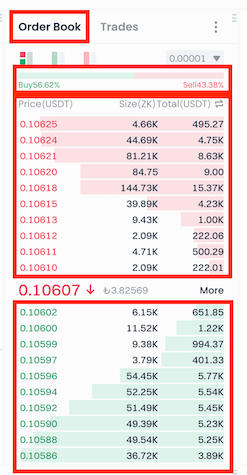
Structure of Gate TR’s Order Book
The order book is composed of four main components:
- Long vs. Short Ratio: Based on margin trading data, this shows traders’ directional expectations for an asset. It offers insights into overall market sentiment.
- Bids (Buy Orders): A list of orders placed to purchase an asset at specific prices. Includes both price and quantity.
- Asks (Sell Orders): Orders waiting to be sold at certain prices. It also includes price and quantity.
- Trades (Executed Orders): Displays matched buy and sell orders in real time, showing completed trades.
What Is the Purpose of the Order Book?
The order book helps investors by:
- Providing market transparency
- Displaying supply-demand balance
- Offering short-term clues on price movements
- Helping assess trader sentiment
Note: Since order book data changes rapidly, it’s most useful for short-term analysis—not suitable for long-term trend evaluation.
Gate TR Order Book Features
View Mode Selection
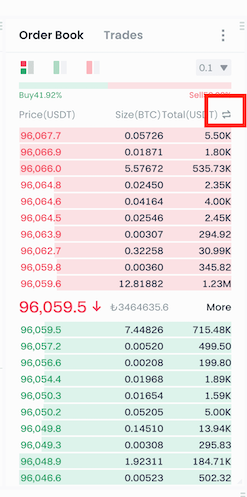
You can switch between different display modes by clicking the double arrow icon at the top right.
For example, on the BTC/USDT pair, you can:
- View the total value in BTC and USDT for each price level
- Or examine the volume of each individual order
Highlighted Display (Hover Feature)
When you hover your cursor over a price level, you’ll see highlighted data such as:
- Average price
- Total amount (in base currency)
- Total amount (in quote currency)
This feature is useful for analyzing volume concentrations at specific levels.

For any issues, feel free to contact destek@gate.com.tr. You can also use the Gate TR app: go to your profile and tap the microphone icon in the top right to reach the Help Center and speak with a support agent.
You can also submit feedback through our Suggestions & Feedback page to win rewards!
