
The fund password is a critical verification step for account security. Even if all your personal data is compromised or your phone is stolen, your assets cannot be sold or transferred without this password. For that reason, never share your fund password with anyone and do not store it on your phone.
If you would like to follow the steps for setting a fund password, please click on the YouTube link below.
Follow the steps below to set your fund password:
Step 1: Tap the profile section in the top left corner.
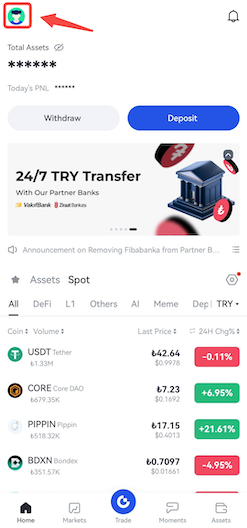
Step 2: Tap the area highlighted in red below.
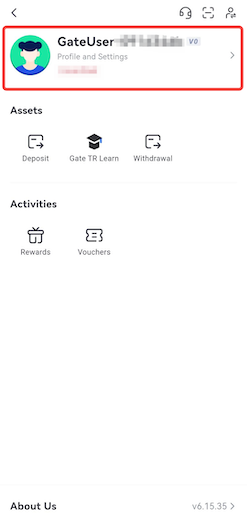
Step 3: On the screen that opens, tap the Security tab.
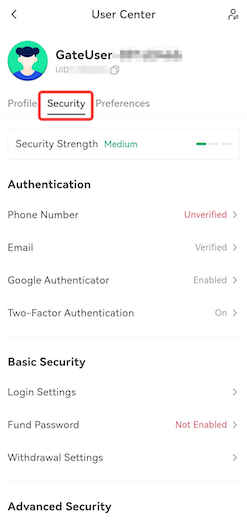
Step 4: Scroll down a bit and tap the Fund Password page under the Basic Security section.
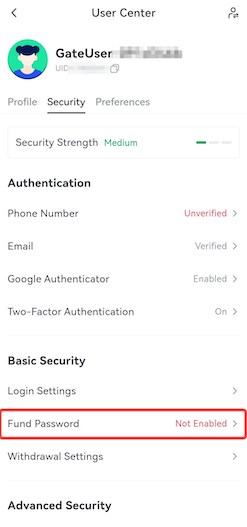
Step 5: On the page that opens, set your fund password and re-enter it for confirmation. Then request a verification code to be sent to your email address and enter the code in the provided field. Once you click the Confirm button, your fund password will be successfully set.

For any issues, feel free to contact destek@gate.com.tr. You can also use the Gate TR app: go to your profile and tap the microphone icon in the top right to reach the Help Center and speak with a support agent.
You can also submit feedback through our Suggestions & Feedback page to win rewards!

